
| What Is a Perchance Content Warning? (Quick Answer) A Perchance content warning is a soft moderation flag that appears when a generator’s inputs, outputs, or structure suggest potentially sensitive, explicit, or unsafe content. It doesn’t immediately remove your generator — but it can show a warning banner, reduce visibility in public listings, and limit sharing or discovery. In most cases, it’s triggered by keywords, unfiltered user input, or broken generator logic — not necessarily explicit content itself. That distinction matters more than most guides acknowledge. |
You build a Perchance generator. It works perfectly. Then a content warning appears with no clear explanation — just a vague flag that affects visibility and trust.
This is one of the most common frustrations in the Perchance ecosystem, especially for creators building AI story generators, image generators, and roleplay or fanfiction tools. The platform doesn’t “ban first” — it flags first. And those flags are frequently misunderstood, because the triggers aren’t always what you’d expect.
This guide breaks down what Perchance content warnings actually mean, the real triggers (including hidden structural ones most guides ignore), step-by-step fixes that work, and how API behavior differs from browser behavior in ways that catch experienced creators off guard.
What Causes a Perchance Content Warning?
A content warning trigger is any signal — textual, structural, or behavioral — that suggests a generator may produce unsafe or sensitive output. The system operates across several layers simultaneously, which is why two generators with similar content can receive completely different treatment.
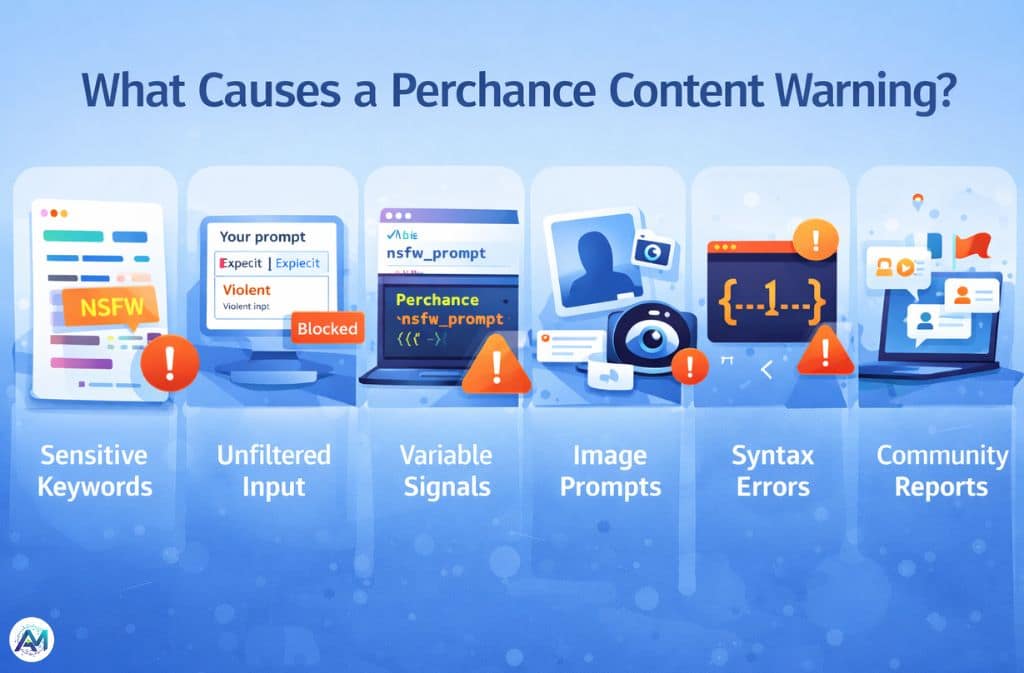
1. Sensitive or Explicit Keywords
Certain words automatically raise flags, even in entirely fictional contexts. Adult and NSFW terms are the obvious category, but violent descriptions and references to illegal or harmful topics also register — regardless of the surrounding narrative intent. Perchance’s moderation reacts to intent signals embedded in language, not just final rendered output. A word that appears benign in a published story can still flag a generator if it sits inside a prompt template.
2. Unfiltered User Input — The Most Common Cause
Generators marketed as “AI story generator (free unlimited)” or “no restrictions AI generator” carry the highest risk, because unfiltered input fields mean users can submit anything and outputs become unpredictable. This is consistently the number one reason generators get flagged — not the creator’s content, but the user’s ability to inject content the system can’t anticipate.
3. Variable Names and Hidden Structural Signals
This one surprises most creators. From real testing: a variable named nsfw_prompt can trigger a warning even when every output is completely clean. Renaming it to detailed_description — no other changes — can remove the flag. Perchance scans naming conventions and structural patterns, not just content. A generator built around the text-to-image plugin with image gallery output goes through additional moderation layers that purely text-based generators don’t encounter.
4. AI Image Generator Prompts
Generators using explicit image prompts, “realistic human generator” setups, or suggestive phrasing face higher scrutiny. The combination of photorealism and ambiguous subject matter creates edge cases the system defaults to flagging. Perchance’s AI image generator runs client-side using WebGL and WebGPU — which improves privacy but also means the platform’s moderation layer focuses more heavily on the prompts and structure rather than the output itself, since it has less visibility into what’s actually being generated.
5. Syntax Errors and Broken Logic
A major blind spot. Warnings regularly appear because of invalid Perchance syntax, infinite loops, or broken generator structure — not because of content at all. The system may interpret structural malfunction as spam behavior or potential abuse. If your generator breaks mid-generation or produces unexpected loops, that alone can trigger a flag. Always validate your syntax independently before assuming content is the issue.
6. Public Visibility and Community Reporting
Perchance moderation isn’t purely automated. The community hub functions as both a discovery layer and an informal feedback mechanism — which means the same generator can behave differently depending on how much traffic it receives. A generator running quietly in private may attract no attention; the same generator after viral sharing may accumulate community reports that accelerate a flag. Popularity, counterintuitively, increases moderation exposure.
How Perchance Moderation Works in 2026
Perchance uses lightweight moderation combining automation with community signals. It relies on keyword detection, structural analysis, user reports, and soft flagging — not hard bans. Most warnings are reversible and non-permanent. The system is designed to be flexible precisely because the platform hosts thousands of community-built generators covering an enormous range of creative territory.
According to testing documented by Aitoolsbee, Perchance’s client-side processing model means that unlike server-based platforms such as Midjourney or DALL-E 3 which retain data for up to 30 days, Perchance processes locally in the browser — which affects both privacy and how moderation signals are evaluated. There is no persistent server-side record of generation attempts to review.
API vs Browser Behavior — Advanced Insight
Browser-based generators run in local browser storage and show visible warning banners. The moderation there is relatively lenient and visible — you know when something is flagged.
API and embedded use operates differently. Repeated requests, unfiltered outputs, and looping logic all trigger more aggressive responses in API contexts. Where browser interaction returns a warning banner you can see and address, API behavior often produces silent failure or throttling — no warning, just degraded or absent output. Creators running generators embedded in external sites or accessed programmatically should test specifically for this, because the absence of a visible warning does not mean the generator is operating cleanly.
The CSS Bypass Myth
Some creators attempt to hide warnings using CSS:
.warning-banner {
  display: none;
}
This makes the banner disappear visually. The warning still exists internally. Visibility in public listings is still reduced. In some cases, attempting to visually suppress a warning may further degrade trust signals rather than improving them. Hiding a warning is not the same as resolving it — and the platform treats them differently.
How to Fix a Perchance Content Warning (Step-by-Step)
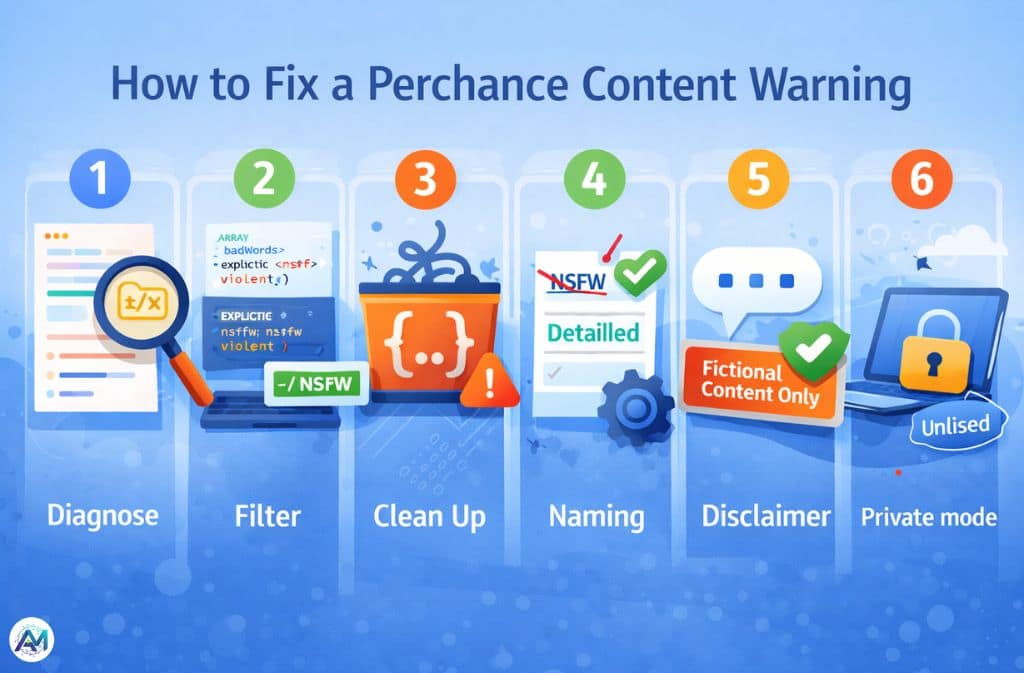
Step 1: Diagnose Before You Fix
Don’t assume the trigger is content. Check prompt inputs, output examples, variable names, and generator structure in that order. A syntax error or poorly named variable is faster to fix than a content overhaul and is more often the actual cause.
Step 2: Add a Basic Filter System
Even a simple filter dramatically reduces flags:
output = {input}
badWords = ["explicit", "nsfw", "violent"]

if(badWords.some(word => output.includes(word))) {
  output = "Content blocked due to safety filter."
}

output
The filter doesn’t need to be comprehensive — it needs to demonstrate that the generator is making an active effort to control outputs. That signal matters to the moderation system.
Step 3: Clean Generator Structure
Fix broken syntax, eliminate infinite loops, and remove invalid variables. Use valid Perchance templating syntax throughout and test outputs manually across a range of inputs before publishing. Structure problems are invisible to the creator but legible to the moderation layer.
Step 4: Adjust Variable and Generator Naming
Small wording changes carry more weight than most creators expect:
| Risky Term | Safer Alternative |
|---|---|
| nsfw | detailed |
| explicit | descriptive |
| no limits | creative mode |
| uncensored | open-ended |
| 18+ generator | mature themes |
These aren’t cosmetic changes — they directly affect how the structural scan interprets the generator’s intent.
Step 5: Add a Disclaimer
Adding a note like “Fictional content only” or “User discretion advised” in the generator description helps reduce automated suspicion by signaling that the creator is aware of and managing content risk. It’s a lightweight intervention with meaningful impact.
Step 6: Use Private Mode for Experimentation
For generators in development or testing phases, keep them unlisted. A private generator receives no community reports and minimal automated scrutiny. Test publicly-facing outputs thoroughly before publishing — the moderation exposure starts the moment visibility does.
The Safety vs Freedom Trade-Off
| Freedom Level | Visibility |
|---|---|
| High (no limits) | Low |
| Medium (filtered) | Balanced |
| Low (strict) | High |
This trade-off is structural, not negotiable. More freedom in a generator means more unpredictable output, which means more moderation flags. Creators who need maximum visibility work within constraints by design — not as a limitation, but as the condition for reaching a public audience at all.
Common Mistakes That Make Things Worse
Using trigger words in variable names is the most overlooked issue. Allowing raw, unfiltered input without any filter logic is the most common. Over-relying on “18+” or “no restriction” branding in generator titles and descriptions creates a front-loaded signal that the moderation system picks up before it even evaluates content. Trying to hide warnings via CSS wastes time that would be better spent fixing the underlying cause. And ignoring syntax errors entirely — treating them as minor — lets the most fixable category of flags persist indefinitely.
Real-World Example
A generator titled “AI Story Generator (Free Unlimited No Restrictions)” was flagged within 24 hours of public listing. The problems were three-layered: unfiltered input field with no sanitization, risky title wording sending clear intent signals, and genuinely unpredictable output because there were no structural guardrails on what users could inject.
The fix: adding a basic word filter, renaming to “AI Creative Story Generator,” and cleaning up one syntax error that had gone unnoticed. The warning resolved within the platform’s next moderation cycle. No content was removed or changed — only structure and framing.
2026 Trends: Where Perchance Is Heading
Perchance’s moderation approach continues to favor soft flagging over hard bans — a deliberate choice that keeps the platform accessible for the enormous variety of legitimate creative use cases it serves. But the detection layer is getting smarter about structural signals, not just keywords. Generators that would have slipped through in 2024 on naming alone are being caught earlier.
Private and niche generators are growing as a result — creators building for specific audiences rather than public discovery, where moderation pressure is lower and creative range is wider. The platform’s ad-supported, subscription-free model (confirmed still operational as of January 2026) means these dynamics are unlikely to shift toward stricter enforcement as long as the community remains self-regulating.
Quick Fix Cheat Sheet
- Remove risky keywords from variable names and generator titles
- Add at minimum a basic filter for user input
- Fix all syntax errors before attributing flags to content
- Add a short fictional content disclaimer to the description
- Test in private mode before publishing
- Avoid “no limits” or “unrestricted” positioning in public listings
Is Perchance AI Safe?
Yes, with context. Most generators run in-browser using client-side processing, which means data doesn’t leave your device during generation. Perchance is significantly less restrictive than major AI platforms, which is both its appeal and the source of most content warning situations. Content warnings exist precisely because the platform gives creators real control — and that control carries real responsibility for how generators are built and presented.
FAQs
Q. What does a Perchance content warning mean?
It’s a moderation flag indicating your generator may produce sensitive or unsafe content. It can reduce visibility and limit sharing, but in most cases it’s reversible through structural or content adjustments.
Q. How do I remove a Perchance content warning?
Filter inputs, remove risky keywords from variable names and titles, fix syntax errors, and add a fictional content disclaimer. Structural fixes resolve more flags than content changes in most cases.
Q. Why is my AI story generator flagged?
Usually due to unfiltered input fields, risky variable naming, or generator title wording that signals unrestricted content — even when the actual output is clean.
Q. Can I ignore Perchance warnings?
Sometimes, but they reduce visibility in public listings and limit sharing potential. Ignoring them is a trade-off, not a resolution.
Q. Does Perchance use strict moderation?
No. It uses lightweight, flexible moderation with soft warnings and community signals. Most flags are reversible and the system favors flagging over banning.
Q. Is there a no-restrictions mode?
Not officially. Generators positioned as unrestricted are consistently among the first to be flagged, because the positioning itself functions as an intent signal to the moderation layer.
Q. Does Perchance store data?
Most generators process client-side using the browser’s WebGL or WebGPU — no server upload, no stored generation data. This is one of Perchance’s genuine privacy advantages over server-based competitors.
Conclusion
A Perchance content warning isn’t random — it’s a signal, and usually a fixable one. From real testing, even small structural details like variable naming conventions or missing input filters can trigger flags faster than actual content. The platform’s moderation system scans intent signals at multiple layers simultaneously, which means the fix is rarely one thing and almost never requires removing the content itself.
Warnings are usually reversible. Structure matters as much as content. And a basic filter, applied early, solves more issues than any other single intervention.
Audit your generator’s structure and naming first, add filtering logic second, and test outputs carefully before public listing. That sequence alone resolves the majority of flags creators encounter.
Related: OpenDream AI Art: Complete Guide to the AI Image Generator (2026)