

Discord has quietly become one of the most important gathering points for AI communities. Anime roleplay groups, prompt engineers, indie developers, and curious users all land there to run experiments with AI characters — and searches for “character ai discord” keep climbing because of it.
People find Character AI, spend time chatting with fictional personalities on the website, then ask the natural follow-up: can I bring these characters into my Discord server?
The answer isn’t a clean yes or no.
Some users just want the official Character AI Discord server. Others are hunting for a bot that can talk inside their channels. A smaller but growing group of advanced users are building full AI character systems using APIs, memory databases, and proxy layers. Most guides online handle none of this well — they either drop the official invite and stop, or link to a GitHub project without explaining what it actually does.
This guide covers all three paths.
What “Character AI Discord” Actually Means
The phrase gets used loosely, which is why so many searches end in confusion. In practice, it refers to one of three things:
- The official Character AI community server
- A Discord bot that mimics Character AI behavior
- AI roleplay communities inspired by Character AI
Casual users are usually looking for the official server. Developers and power users want AI characters running inside Discord chats. These are completely different problems with completely different solutions — understanding which one you’re actually solving saves a lot of wasted time.
The Official Character AI Discord Server
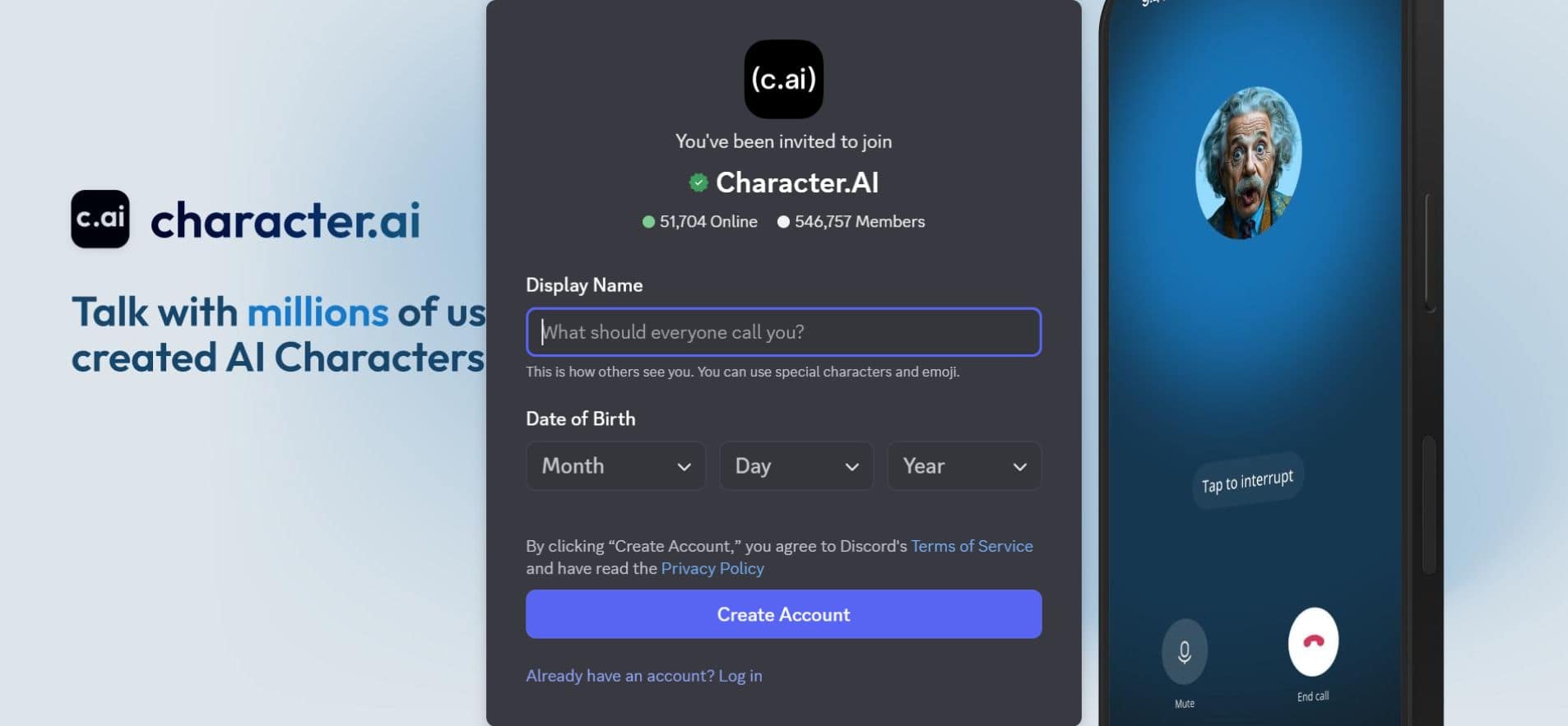
Character AI runs a large community server where users discuss characters, prompts, and platform updates. The official invite currently sits at over 546,000 members, making it one of the larger AI-specific communities on the platform.
Worth noting: you won’t actually chat with AI characters inside this server. It functions as a community hub, not a chatbot platform.
Typical channels include announcement feeds for product updates, prompt engineering discussions, character sharing threads, feedback and bug reports, and general AI conversation rooms. Occasionally it becomes a testing ground — when Character AI pushes a new update or model change, word usually spreads through Discord before anywhere else. Some character prompts have gone genuinely viral inside the server, with hundreds of users running the same experiment simultaneously to compare outputs.
For most people, joining is simply the easiest way to stay current with the broader Character AI ecosystem.
Can You Add Character AI to Discord?
Despite the volume of searches for “character ai discord bot,” Character AI does not offer an official Discord bot — and as of early 2026, there are no signs that’s changing soon.
The reasons are architectural. Character AI’s system depends on centralized moderation and proprietary infrastructure. Allowing direct connections from thousands of Discord servers would create moderation gaps and data control problems the company hasn’t been willing to absorb.
That said, developers haven’t waited. Three workarounds dominate:
First: Some servers link back to the Character AI website and keep Discord as a discussion layer only.
Second: Many communities install AI chatbot bots powered by external language models that simulate Character AI-style conversations.
Third: Advanced communities build custom AI character systems using APIs, memory databases, and proxy tools.
Each option sits at a different point on the complexity-to-control spectrum.
How AI Discord Bots Actually Work
The experience of chatting with an AI character in Discord feels seamless, but the architecture running underneath it involves several systems in sequence.
When a message gets sent to an AI bot:
Discord Channel
      ↓
Discord Bot
      ↓
Backend Server
      ↓
AI Model API
      ↓
Response returned to Discord
Some advanced bots add a conversation memory layer on top of this — a database that logs past exchanges so the character can reference them later. Without that memory component, every conversation starts from zero. With it, the bot starts to feel like an actual persistent character rather than a generic response machine.
The memory layer is what separates a functional chatbot from something that genuinely feels like a consistent personality.
Advanced Setup: Using SillyTavern as a Proxy
Server admins who want persistent personalities, world lore, and character memory that evolves over time tend to reach for SillyTavern — an open-source, locally-run LLM frontend built specifically for roleplay and character chat. It never tracks user data and always will be free, according to its own documentation.
Rather than connecting Discord directly to an AI model, the system routes messages through SillyTavern first:
Discord Server
      ↓
Discord Bot
      ↓
SillyTavern Proxy
      ↓
AI Model API
SillyTavern handles prompt formatting, character personality management, conversation memory, and roleplay context — the parts of a good character interaction that raw API calls don’t handle well on their own.
For communities running elaborate roleplay servers, the result can be genuinely impressive: an entire cast of characters with distinct voices, persistent memory, and consistent behavior across long sessions.
Getting there isn’t easy, though. Most admins describe the first setup as a frustrating afternoon — API keys, token limits, hosting, latency — and the learning curve is real. Once it clicks, the payoff is significant. But it is not a beginner project.
Best AI Roleplay Bots for Discord
Since Character AI provides no native bot, communities mix and match alternatives. AICord is one of the more fully-featured options — it supports AI character creation, voice channel interaction, image generation inside Discord, and an applet system that lets characters connect to external apps and run code. Communities looking for character-focused chat without building anything custom tend to use it as a starting point.
| Bot Type | Best Use Case |
|---|---|
| AI Dungeon-style bots | Improvised, unpredictable storytelling |
| GPT-based bots | Stable, consistent AI conversation |
| Character roleplay bots | Persistent personalities and long-running RP |
| Anime AI bots | Fandom roleplay servers |
A handful of larger roleplay servers run two bots simultaneously — one for general AI chat, one dedicated to specific characters with tailored personalities and memories. It costs more to operate but produces noticeably better experiences for users.
For finding and sharing character configurations, communities increasingly use dedicated repositories like Character Hub AI, where creators upload full character cards that can be imported directly into SillyTavern or similar setups.
How Much Does an AI Discord Bot Cost?
Running an AI chatbot in Discord isn’t always expensive, but the costs are real — and most tutorials skip this part entirely.
Even when the bot framework itself is open source, the AI model behind it usually requires paid API calls. For a quiet community server, expenses stay manageable. For active roleplay servers with dozens of concurrent users, the numbers climb.
| Server Size | Estimated Monthly Cost |
|---|---|
| Small server (20 users) | $5 – $15 |
| Medium server (100 users) | $15 – $50 |
| Large roleplay server | $50 – $200 |
Three expense buckets drive most of this: AI API usage, cloud hosting for the bot backend, and storage for conversation memory databases.
One underused strategy: Small Language Models (SLMs) instead of large flagship models. SLMs respond faster, burn fewer tokens per message, and work well for the kind of quick back-and-forth that Discord chat involves. They won’t write elaborate paragraphs, but for in-character replies they often perform just fine at a fraction of the cost.
Discord vs Character AI Content Filters
This is one of the clearest differences between the two environments.
Character AI runs centralized filtering — content policies applied across the entire platform regardless of which character or community a user belongs to. Discord bots run under server-controlled rules, which gives administrators far more flexibility but also moves all moderation responsibility onto them.
| Platform | Moderation System |
|---|---|
| Character AI | Centralized content filters, platform-wide |
| Discord AI bots | Server rules, admin-controlled |
Some communities prefer Discord bots precisely for that flexibility. Others stay on Character AI because the guardrails prevent outputs they’d rather not manage. Neither approach is inherently superior — it depends on the community’s size, goals, and capacity for active moderation.
For context on how Character AI’s own approach to filtering has shifted over time, comparing earlier platform iterations to the current system shows just how significantly the moderation philosophy has changed — and why some power users migrated to self-hosted setups as a result.
Security Warning Before Installing AI Bots
Before adding any AI bot to a server, check the permissions it requests.
Some bots ask for Administrator access, which grants full control over server settings — including the ability to delete channels, remove members, change roles, and alter server configuration wholesale. This is far more than any chatbot legitimately needs.
Experienced moderators follow a consistent rule: review the bot’s GitHub repository before installing, and restrict permissions to only what the bot functionally requires. Message reading, message sending, and thread access cover most legitimate use cases. Administrator access rarely does.
Servers that skip this step occasionally discover the damage firsthand. A malicious bot with elevated permissions can disrupt or effectively destroy a community in minutes.
Character AI Discord Decision Matrix
| Goal | Best Option |
|---|---|
| Join the Character AI community | Official Discord server |
| Chat with AI characters | Character AI website |
| Add AI chat to a server | AI Discord bot (e.g. AICord) |
| Create and share custom characters | Character Hub AI |
| Run complex roleplay worlds | SillyTavern proxy system |
The Future of AI Characters in Discord
The gap between chat platforms and AI-driven character worlds is narrowing. Discord’s bot infrastructure was already one of the most developer-friendly environments on the internet before AI made it interesting — the combination is producing genuinely creative community projects that didn’t exist two years ago.
Some servers now run persistent story worlds where AI characters interact with users across ongoing narrative arcs. Others use bots as NPCs inside tabletop RPG sessions. A few are experimenting with voice-based characters in audio channels.
Whether platform-level integrations eventually close the distance between Character AI’s infrastructure and Discord’s ecosystem remains unclear. For now, the most capable setups are still the ones community members build themselves.
FAQs
Q. Is there an official Character AI Discord server?
Yes. Character AI maintains a public community server with over 546,000 members. The official invite link is available through Character AI’s website.
Q. Is there a Character AI Discord bot invite link?
No official bot exists. Any link claiming to be the “official Character AI bot” is a third-party project — review permissions carefully before installing.
Q. Can you add Character AI to Discord?
Not directly. Developers connect Discord bots to external AI model APIs to simulate Character AI-style conversations, but there is no official integration.
Q. How do developers create AI Discord bots?
Most combine a Discord bot framework, a backend server, and an AI model API. Advanced setups add SillyTavern as a proxy layer and a memory database for persistent character behavior.
Q. Are AI Discord bots safe?
They can be, if installed from trusted developers with appropriate permissions. Always review what access a bot requests before adding it to any server.
Conclusion
“Character AI Discord” covers several distinct use cases that require different answers. The official community server, a third-party AI bot, and a SillyTavern proxy setup are three completely different solutions — and picking the wrong one based on a vague tutorial is a fast way to waste an afternoon.
Character AI itself offers no official Discord bot. That gap has been filled by developers using external AI models, bot frameworks, and proxy tools. The results range from basic to surprisingly sophisticated depending on how much time and infrastructure someone’s willing to commit.
For most people, the official server is the right starting point. From there, the path toward running actual AI characters inside Discord is accessible — it just takes more configuration than the average guide lets on.
Related: Joyland AI: The Viral AI Chat World Everyone’s Talking About